
PRACTICE TO PERFORM
Speak with Confidence | Master Computer Skills | Prepare for Your Future
Do you feel nervous speaking English?
Do you struggle with presentations or feel nervous talking to others?
Do you want to learn computer skills but don't know where to begin?
You are not alone. Many students feel the same — but the good news is, with the right guidance, you can improve. We offer simple, step-by-step training to help you grow your confidence and skills for school, college, and your future.
This isn’t just a course — it’s your journey to becoming confident, skilled, and ready for success.
Our 6-Month Skill Development Program
At P2P Academy, we help students build confidence in speaking English and mastering computer skills for academic and professional success.
150+
60
Trusted by Students
Join Us
Our 6-month skill development course is designed for students who want to overcome hesitation, speak confidently, and become comfortable with computers.
We help students gain the skills that truly matter:
Speak English naturally in daily life
Read and understand English with confidence
Present your ideas clearly and without fear
Learn computer basics from beginner to advanced level (MS Word, Excel, PowerPoint)
IT Career Roadmap— Get personalized guidance to explore IT career options and discover your pathway to success
You don’t need perfect English or prior computer knowledge to start — we guide you from scratch
Skill Development
Empower students to speak confidently and master essential computer skills for success.
ENGLISH FLUENCY & READING
Learn to speak English naturally and present ideas clearly without fear or hesitation.


PUBLIC SPEAKING & PRESENTATION
Speaking in front of others makes many students nervous.
From beginner to advanced, gain proficiency in MS Word, Excel, and PowerPoint.
COMPUTER BASICS — BEGINNER TO ADVANCED



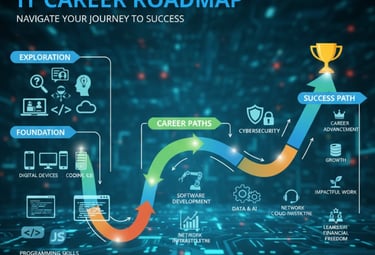
IT Career Roadmap
Get personalized guidance to explore IT career options and discover your pathway to success
ENGLISH FLUENCY & READING
English Fluency and Practical Grammar — Speak with Confidence
Book Reading Activity — Improve Naturally
Reading helps you absorb English without stress. That’s why we read a simple 180-page English book together during the course.
This helps improve:
Vocabulary and word usage
Sentence structure understanding
Pronunciation and reading fluency
By the end of the course, you’ll be amazed at how easily you can read and understand English
English Fluency and Practical Grammar — Speak with Confidence
We understand that speaking English can feel scary, especially if you’re not used to it. But you don’t need to memorize complicated grammar books. We teach practical English that helps you in real conversations.
Slowly and steadily, you’ll gain confidence to speak in English — introducing yourself, sharing your thoughts, and expressing your ideas in daily life.
By the end of the course, you’ll not only understand English better but also use it confidently.
Key Benefits:
Daily speaking practice to remove fear
Step-by-step grammar to build sentence structure
Real-life conversation examples
Confidence to express your thoughts
PUBLIC SPEAKING & PRESENTATION
Presentation and Public Speaking — Express Your Ideas
Speaking in front of others makes many students nervous — we’ve all been there. But with the right practice, that fear disappears.
In this course, you’ll learn how to present your ideas clearly and confidently. We create a safe space where you can practice speaking, improve your body language, and gain real confidence.
You Will Learn:
How to structure your thoughts clearly
Improve your body language and voice control
Speak confidently, even in front of groups
Handle questions without losing confidence
By the time you complete the course, you’ll feel ready to speak in school, college, competitions, job interviews or any real-life situation.
COMPUTER BASICS — BEGINNER TO ADVANCED
In today’s world, computer knowledge is not optional — it’s necessary. That’s why we take you from the very basics to advanced-level skills step by step, with no stress and no complicated terms.
Even if you’ve never touched a computer before, by the end of this course, you will be confident using computers for your studies, projects, and daily life.
MS Word — Create Professional Documents with Ease


MS Excel — Master Data, Numbers, and Smart Work
MS PowerPoint — Present Ideas with Impact


MS Word — Create Professional Documents with Ease
Many students think making documents is difficult, but the truth is — it’s easy when someone explains it step by step. We break down each tool and feature so you never feel lost.
We guide you through creating letters, reports, assignments, and official documents using MS Word. You’ll complete the course knowing how to produce professional, well-formatted documents for school, college, and beyond.
Step-by-step guidance for letters, reports, and assignments
Basic to advanced typing and formatting skills
Inserting tables, images, shapes, and headers
Designing neat, professional documents
What You’ll Learn
Our MS Word training covers all the essentials and advanced techniques so you feel confident with every document:
How to start a document and set up the perfect layout for any purpose—school, college, or work.
Expert formatting: Adjust fonts, spacing, bullets, and indents to make your work stand out.
How to insert tables, charts, images, and graphics for attractive, informative assignments and presentations.
Using headers, footers, and page numbers to keep everything organized.
Reviewing and editing tools: Track changes, comments, and proofing for assignments and group work.
MS Excel — Master Data, Numbers, and Smart Work
Working with numbers and tables feels complicated at first, but we make Excel simple. We start from scratch and teach you how to manage data, perform calculations, create tables, and even design charts.
Once you learn Excel, organizing data for projects, assignments, or personal use becomes easy and efficient.
Excel helps organize data, perform quick calculations, and create charts — we teach it from scratch.
Basic tables, formulas, and formatting
Advanced tips to save time and work smart
Basic to advanced data management
Quick calculations and practical formulas
Data management, Charts and graphs to represent your work professionally
What You’ll Learn
Our Excel course is designed to take you from beginner to proficient user step-by-step, focusing on real-world applications:
Setting up spreadsheets and formatting them for clarity and ease of use,
Using formulas to perform addition, subtraction, average, and more without confusion.
Sorting, filtering, and managing large sets of data efficiently.
Creating helpful charts and graphs to visually showcase your work.
Applying advanced tools that boost productivity and simplify complex tasks
MS PowerPoint — Present Ideas with Impact
Good presentations can open doors — they help you stand out. But creating a presentation feels confusing if you’ve never done it before.
We teach you how to design clean, attractive, and professional presentations in MS PowerPoint. You’ll feel confident organizing information, adding visuals, and presenting your work effectively — skills that help in school, competitions, and future opportunities.
Creating presentations helps you stand out. We show you how to design attractive, professional slides.
Step-by-step presentation creation
Make powerful presentations
Designing engaging slides step by step
Adding images, charts, and smart visuals
What You’ll Master
Our course breaks down the presentation process into easy steps so you build confidence and skills progressively:
Planning and organizing your content for clarity and flow.
Designing slides that are visually balanced and professional.
Adding images, charts, icons, and multimedia to support your message.
Applying slide transitions and animations that enhance without distracting.
By the end, you’ll use Word, Excel, and PowerPoint confidently for school, personal projects, or future job needs.
IT Career Counselling: Build Your IT Future
Choosing an IT career can feel confusing, with so many options and changing trends. Without guidance, it's hard to know what step to take next.
We help you understand your strengths and interests, then guide you through the world of IT careers: software development, data analysis, cybersecurity, support roles, and more. You’ll discover what skills are needed, how to set practical goals, and what path fits you best — whether you want to start now or plan for the future.
Career counselling empowers you to make smart decisions and reach your goals. We show you how to build your own IT roadmap
You Will Learn:
Introduction to IT Careers: Overview of IT industry, various roles (developer, tester, designer, analyst, etc.), job trends.
Skills & Qualifications: Key technical and soft skills, certifications, educational pathways.
Career Pathways & Specializations: Different specializations (AI, Cybersecurity, Cloud, Software Development, Data Science).
Setting Goals & Planning: Goal setting, creating a career roadmap, short-term and long-term planning.
Resume Building & Interview Prep: Resume tips, interview strategies, how to showcase skills and projects,
Industry Insights & Networking: Industry expectations, networking tips, internships, certifications
By the end of this program, you’ll feel confident making informed career choices with a clear plan to navigate the ever-evolving IT landscape. Whether your goal is to land your first job or upskill for your next role, this guidance sets you on the path to success.
PROGRAM BENEFITS
When you commit to this 6-month program, you’ll see real improvement — not just in your skills, but in your confidence and mind-set.
What You Will Gain after 6 Months
Speak English naturally and confidently
Improve reading, vocabulary, and sentence formation
Present your ideas clearly and without fear
Use computers (Word, Excel, PowerPoint) from beginner to advanced level
Understand project and operation basics for better task management
Understand how to manage projects and tasks effectively
Build the confidence needed for higher studies, interviews, and your future career
Gain clarity and confidence to choose and prepare for your ideal IT career, with expert guidance and support every step of the way.
This course is designed to prepare you for real situations — no heavy theory, only practical learning at your pace
COURSE DETAILS
Course Duration & Schedule
6 Months Skill Development Program
Total 90 Hours
3 Hours — Per Week
Extra 45-Minute Practice Session — 1 Day per Week
Total: 3 Hours 45 Mins per Week
Affordable, high-quality training to build skills for life.
Enroll Today
Your Confidence is waiting — Take the First Step Today
The only thing standing between you and the confident, skilled version of yourself is the decision to start. You don’t need to be perfect now — you only need the willingness to learn and grow.
We are ready to guide you every step of the way. Are you ready to say yes to your future?
Don’t wait. 👉 Call or WhatsApp: +91-9686525403
Let’s begin your journey toward speaking better, working smarter, and feeling more confident in life.
Your Confidence is Waiting — Let’s Get Started!
P2P ACADEMY
Empowering students to communicate and excel.
Contact
info@p2pacademy.com
+91-9686525403
© 2025. All rights reserved.
+91-9591397433